
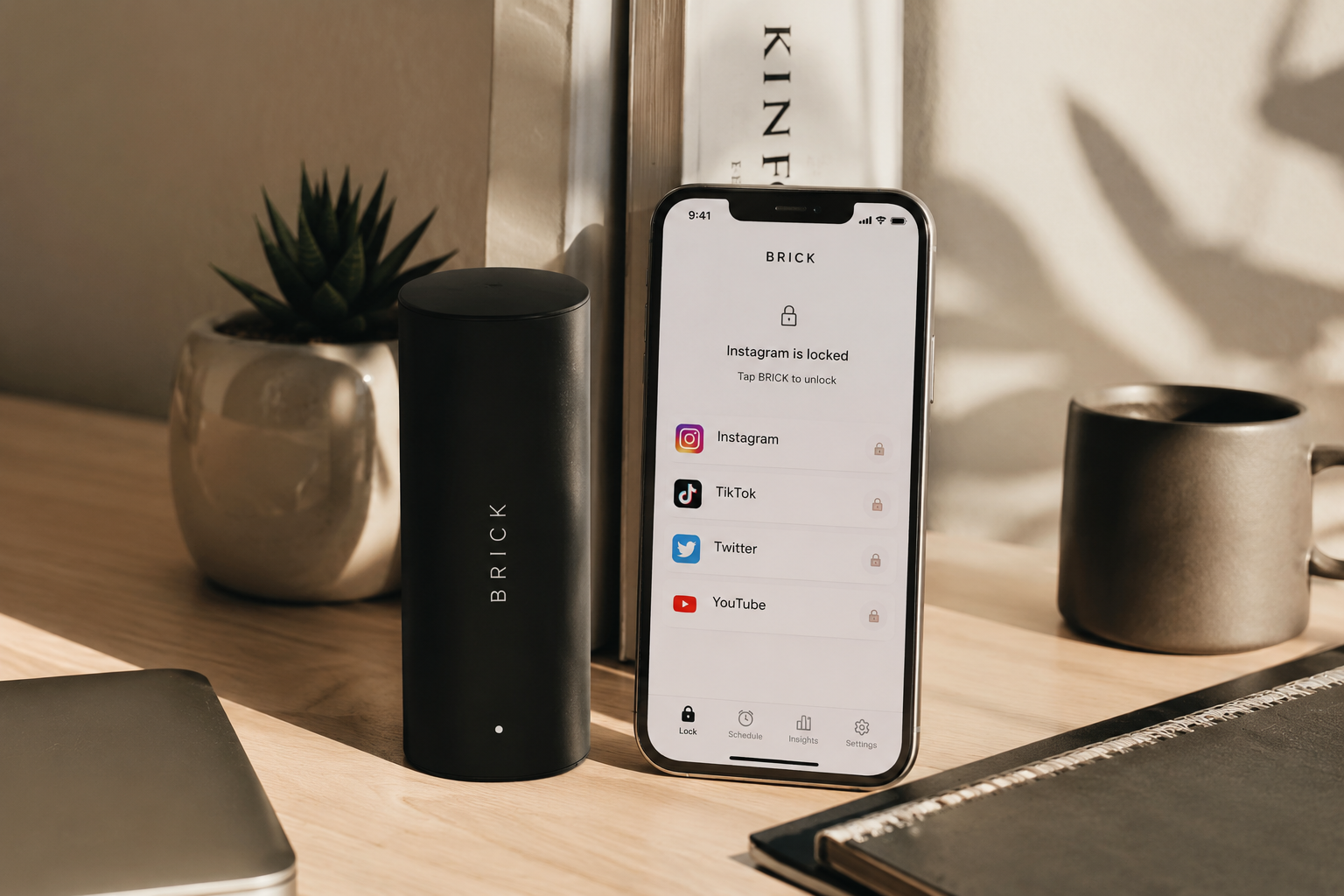
Smartphone addiction has become one of the biggest modern-day problems. From endless TikTok scrolling to checking Instagram every few minutes, millions of people struggle to control their screen time. That’s where Brick comes in — a viral digital detox device designed to help users reduce phone addiction using a unique physical unlocking system.
But does Brick actually work, or is it just another trendy productivity gadget?
In this detailed Brick Review 2026, we’ll explore its features, how it works, pros and cons, pricing, and whether it’s worth buying for students, professionals, and anyone trying to improve focus.
What Is Brick?
Brick is a physical NFC-based device that connects with a mobile app to block distracting applications on your smartphone. Unlike traditional screen-time apps, Brick requires users to physically tap their phone against the Brick device to lock or unlock selected apps.
This physical interaction creates intentional friction, making it harder to impulsively open addictive apps like:
- TikTok
- YouTube
- X (Twitter)
- Snapchat
- Mobile games
The idea behind Brick is simple: if accessing distracting apps requires effort, users become more mindful about their phone habits.
Why Brick Became Viral in 2026
Brick exploded on TikTok, Instagram Reels, and YouTube Shorts because of its minimal design and practical approach to digital wellness.
Many users were tired of:
- Ignoring screen time reminders
- Disabling app timers
- Mindlessly scrolling for hours
- Feeling unproductive and mentally drained
Unlike normal productivity apps, Brick introduces a physical barrier between the user and distractions.
This concept resonated especially with:
- Students
- Remote workers
- Entrepreneurs
- Creators
- People dealing with dopamine addiction
- Individuals practicing digital minimalism
How Does Brick Work?
The setup process is surprisingly simple.
Step 1: Connect the Brick App
Users install the Brick app on their smartphone and choose which apps they want to block.
Step 2: Customize Restrictions
You can:
- Block social media apps
- Limit gaming apps
- Restrict entertainment platforms
- Create focus schedules
- Build productivity routines
Step 3: Tap the Brick Device
To unlock blocked apps, users must physically tap their phone on the Brick device.
This extra step interrupts impulsive behavior and helps users regain control over their attention.
Key Features of Brick
1. Physical App Blocking
This is Brick’s biggest advantage. Most screen-time apps fail because users can easily ignore them. Brick adds real-world accountability.
2. Minimalist Design
The device looks modern, aesthetic, and compact — perfect for Gen Z productivity setups.
3. Custom Focus Modes
Users can create multiple focus routines such as:
- Study mode
- Sleep mode
- Work mode
- Gym mode
- Deep focus sessions
4. No Monthly Subscription
Unlike many productivity tools, Brick offers a straightforward purchase without expensive recurring fees.
5. Easy to Use
The interface is clean, beginner-friendly, and requires very little setup.
Does Brick Actually Help Stop Phone Addiction?
The answer is: yes, for many users it does.
Brick works because it targets behavioral psychology rather than relying only on willpower.
Most people don’t intentionally decide to spend hours on social media. The behavior is often automatic. Brick interrupts that automatic habit loop.
Why It Works
- Adds friction to distractions
- Increases mindfulness
- Creates intentional phone usage
- Reduces impulsive scrolling
- Encourages healthier digital habits
Many users report:
- Lower daily screen time
- Improved concentration
- Better sleep
- Increased productivity
- Less anxiety from constant notifications
However, Brick is not magic. Users still need self-discipline and genuine motivation to reduce phone usage.
Pros and Cons of Brick
Pros
- Innovative physical blocking system
- Helps reduce social media addiction
- Stylish and portable design
- Easy app setup
- Great for productivity and focus
- Effective for students and remote workers
- Encourages healthier habits
Cons
- Some users may find workarounds
- Requires commitment to be effective
- Premium pricing compared to normal apps
- Limited usefulness if users ignore routines
Brick vs Traditional Screen Time Apps
| Feature | Brick | Traditional Apps |
|---|---|---|
| Physical interaction | Yes | No |
| Easy to bypass | Harder | Very easy |
| Focus motivation | Strong | Weak |
| Digital wellness design | Excellent | Average |
| Habit interruption | High | Low |
Brick’s physical approach gives it a significant advantage over standard app blockers.
Who Should Buy Brick?
Brick is ideal for:
- Students struggling with distractions
- Professionals working remotely
- Content creators wanting more focus
- People trying dopamine detox routines
- Anyone wanting healthier digital habits
It may not be necessary for users who already have strong self-control with smartphones.
Is Brick Worth Buying in 2026?
If you constantly find yourself checking social media without thinking, Brick can genuinely help reduce phone addiction and improve productivity.
Its biggest strength is psychological interruption. Instead of relying on weak app notifications, Brick changes user behavior through physical action.
While it won’t completely eliminate smartphone addiction overnight, it is one of the most practical digital wellness gadgets available in 2026.
Final Verdict: Brick Review 2026
Brick stands out as one of the best productivity gadgets for fighting smartphone addiction in 2026. Its physical app-blocking system feels refreshing in a world filled with ineffective screen-time reminders.
For users serious about reducing distractions, improving focus, and building healthier habits, Brick is absolutely worth considering.
Best For
- Productivity lovers
- Students
- Entrepreneurs
- Digital detox users
- Remote workers
Not Ideal For
- Users expecting instant results
- People unwilling to change habits
Frequently Asked Questions
Does Brick work with iPhone and Android?
Yes, Brick supports both iOS and Android devices.
Can Brick completely block social media apps?
Yes, users can select and block specific apps through the Brick app.
Is Brick better than Screen Time apps?
For many users, yes. The physical unlocking process makes Brick more effective than traditional screen-time reminders.
Is Brick worth buying?
If you struggle with doomscrolling and social media addiction, Brick can be a valuable productivity investment.
 spotpresence